
Each approved merchant account needs unique API credentials. These credentials identify the merchant account when your platform sends payment requests on the merchant’s behalf.
When the merchant is approved to process transactions, BlueSnap sends the merchantId in the MERCHANT_PARTNER_ONBOARDED webhook and indicates whether the account is approved to process payments. If so, use the ID to generate the merchant’s API credentials and begin processing payments.
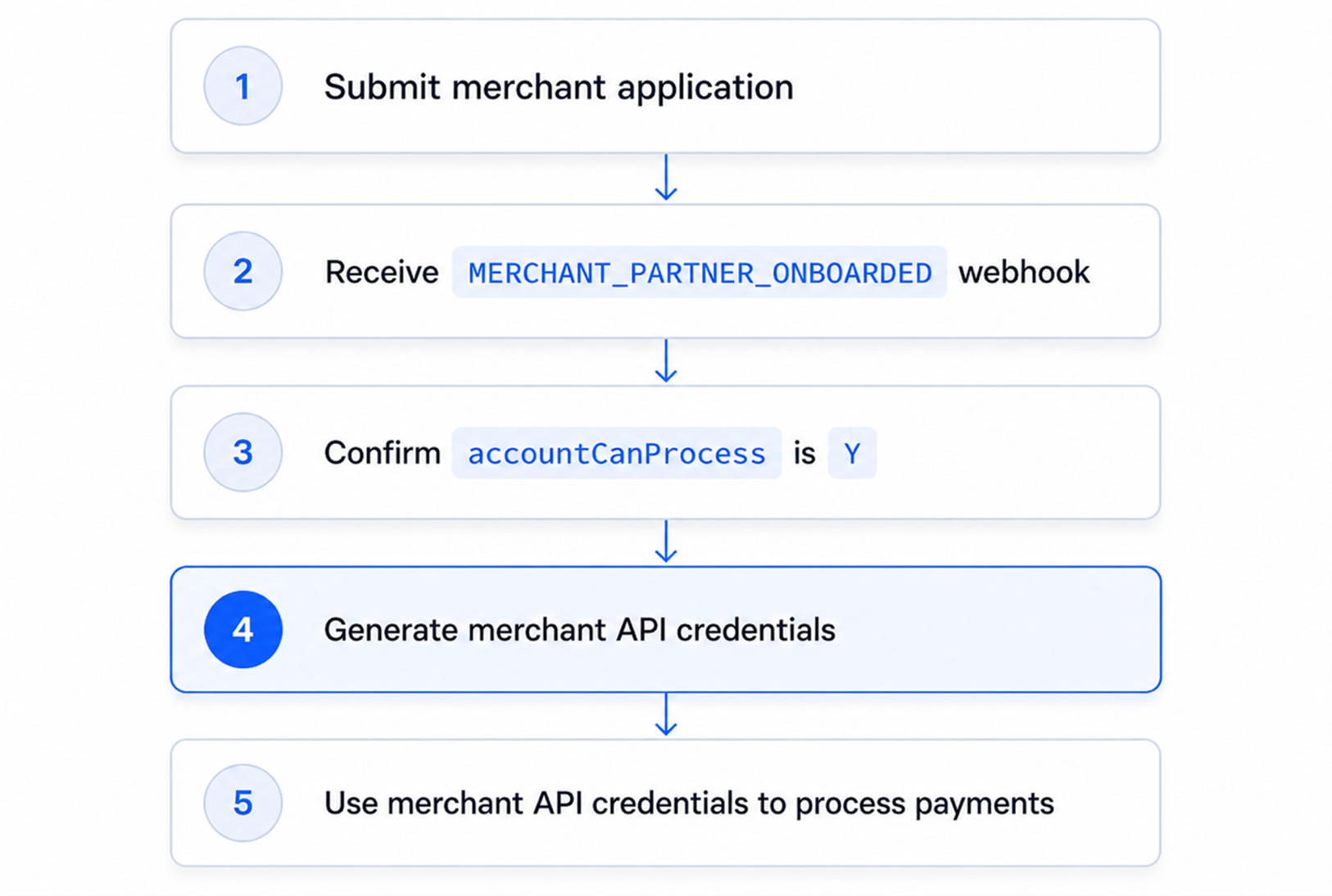
Types of Credentials
Your platform uses two types of credentials:
| Credential Type | Used For: | Notes |
|---|---|---|
| Platform API credentials | Calling platform-level endpoints, including the API Credentials endpoint. | These credentials belong to your platform account. |
| Merchant API credentials | Processing transactions for a specific merchant. These are returned by the API Credentials endpoint. | Generate a separate credential set for each merchant. |
Do not use platform credentials to process merchant transactions, and do not reuse one merchant’s credentials for another merchant.
Merchant API Credentials
BlueSnap authenticates REST API requests with Basic authentication.
- A generated credential set includes
merchantId,username,password, anddataProtectionKey. - Use the
usernameandpasswordto create the Basic authentication value for merchant payment requests. - Use
dataProtectionKeyfor BlueSnap functions that require data protection.
Generate merchant API credentials only when the
MERCHANT_PARTNER_ONBOARDEDwebhook includes amerchantIdandaccountCanProcessis "Y".A merchant can be approved to process transactions before they are approved to receive payouts. You do not need to wait for
payoutStatusto be "Y" before generating merchant API credentials.
Generate Credentials
To generate the credentials, send the merchant ID in a POST request to the Generate Credentials API.
In most integrations, you can omit username, password, and dataProtectionKey and let BlueSnap generate them based only on the merchantId. Provide those additional values only if your platform has a specific credential management requirement.
curl -v -X POST https://platform.bluesnap.com/services/2/merchants/api-credentials \
-H 'Content-Type: application/json' \
-H 'Accept: application/json' \
-H 'Authorization: Basic dXNlcm5hbWU6cGFzc3dvcmQ=' \
-d '
{
  "merchantId": 857345
}'
curl -v -X POST https://platform.bluesnap.com/services/2/merchants/api-credentials \
-H 'Content-Type: application/json' \
-H 'Accept: application/json' \
-H 'Authorization: Basic dXNlcm5hbWU6cGFzc3dvcmQ=' \
-d '
{
"merchantId": 857345,
"username": "MerchantUsername",
"password": "kjhdA@3aA",
"dataProtectionKey": "Kru5Y50p"
}'A successful request returns a 200 OK response with the merchant credentials.
{
  "merchantId": 857345,
  "username": "ABCMerchant",
  "password": "kjhdA@3aA",
  "dataProtectionKey": "Kru5Y50p"
}
{
"merchantId": 857345,
"username": "MerchantUsername",
"password": "kjhdA@3aA",
"dataProtectionKey": "Kru5Y50p"
}Store the returned credentials securely. Do not log the password or expose credential values in your platform UI, analytics tools, support tickets, or client-side code.
Create Basic Authentication Value
To authenticate merchant API requests, base64-encode the returned username and password in username:password format.
echo -n "ABCMerchant:kjhdA@3aA" | base64QUJDTWVyY2hhbnQ6a2poZEFAM2FBUse the encoded value in the Authorization header when processing payments for the merchant, such as Authorization: Basic QUJDTWVyY2hhbnQ6a2poZEFAM2FB.
Do not refer to this encoded value as a shared platform credential. It is specific to the merchant whose username and password were encoded.
Recommended Platform Behavior
When generating merchant API credentials:
-
Wait for the onboarding webhook.
-
Confirm the webhook includes
merchantIdandaccountCanProcessis "Y". -
Check whether credentials already exist for the merchant.
-
Send the API Credentials request.
-
Store the returned credentials securely.
-
Associate the credentials with the merchant record.
-
Use the credentials only for that merchant’s API requests.
Credential Security Best Practices
Before calling the endpoint, check whether your platform already has credentials for the merchant. Your platform should:
- Store credentials in encrypted storage
- Restrict access to credential values
- Avoid exposing credentials in logs
- Avoid sending credentials to client-side applications
- Use separate credentials for each merchant
- Keep an audit trail of credential generation events
Do not enable payment processing until credentials are generated and stored successfully.
If credential generation fails, keep the merchant in a setup-required state and retry only after confirming the merchant is approved to process.
Test Credential Generation
When calling the API Credentials endpoint, set approvalTesting to "true" to test the API credentials request and response without generating production credentials for a merchant. This can be used to verify that your platform can:
- Call the API Credentials endpoint
- Store the returned credential values
- Create the Basic authentication value
- Associate credentials with the correct merchant
- Handle success and error responses
Use this option only with a
merchantIdreturned from a supported simulated onboarding flow.
curl -v -X POST https://platform.bluesnap.com/services/2/merchants/api-credentials \
-H 'Content-Type: application/json' \
-H 'Accept: application/json' \
-H 'Authorization: Basic dXNlcm5hbWU6cGFzc3dvcmQ=' \
-d '
{
  "approvalTesting": true,
  "merchantId": 857345,
  "username": "MerchantUsername",
  "password": "kjhdA@3aA",
  "dataProtectionKey": "Kru5Y50p"
}'
For more information, refer to Test Merchant Setup.